AOC by ThinkWork · site management software

Your game day, run from one screen.

Booking from a player's phone, reception that knows who has signed, parties from enquiry to played, and the money in your own Stripe account. Built for airsoft and adventure sites, with two of them.

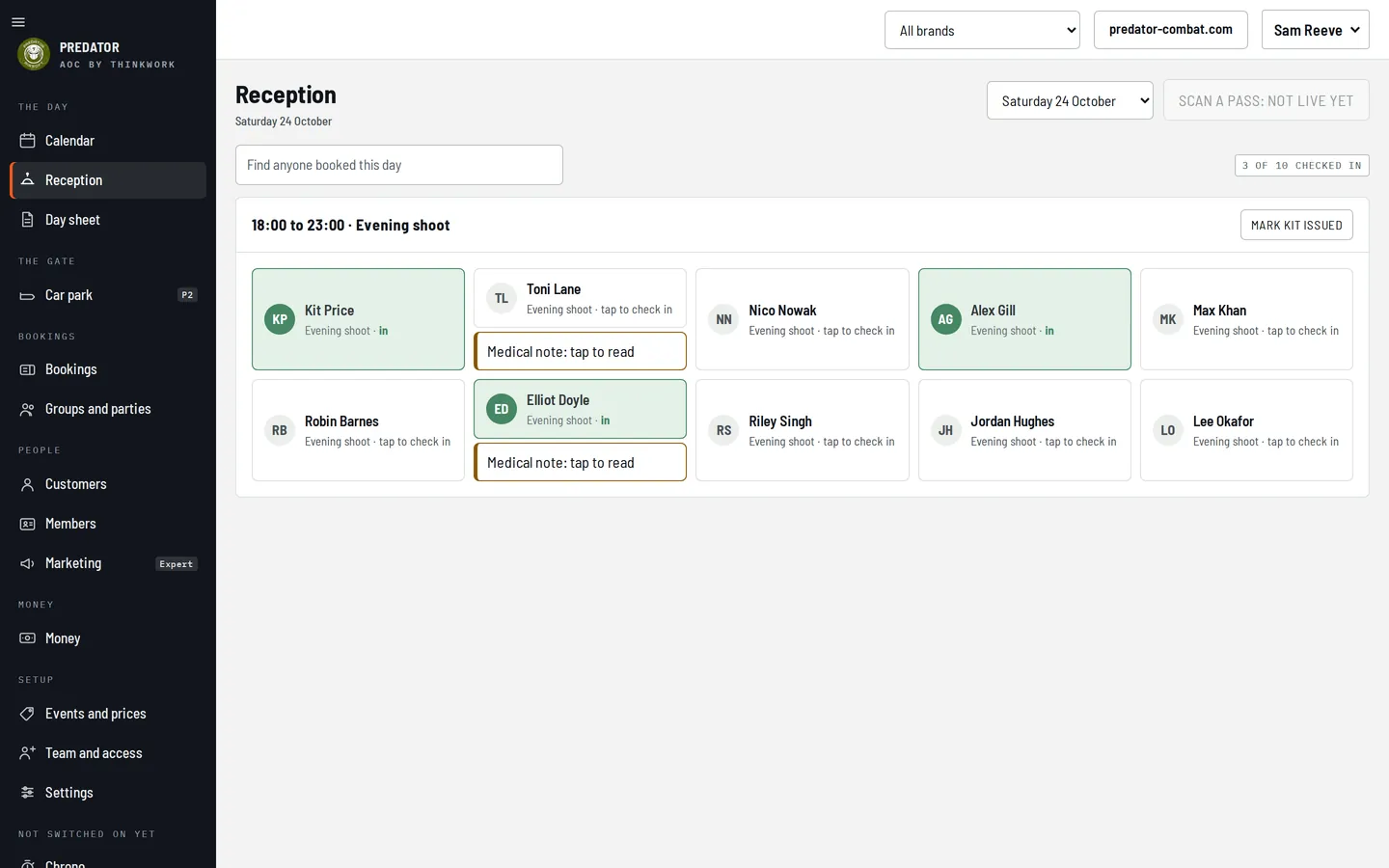
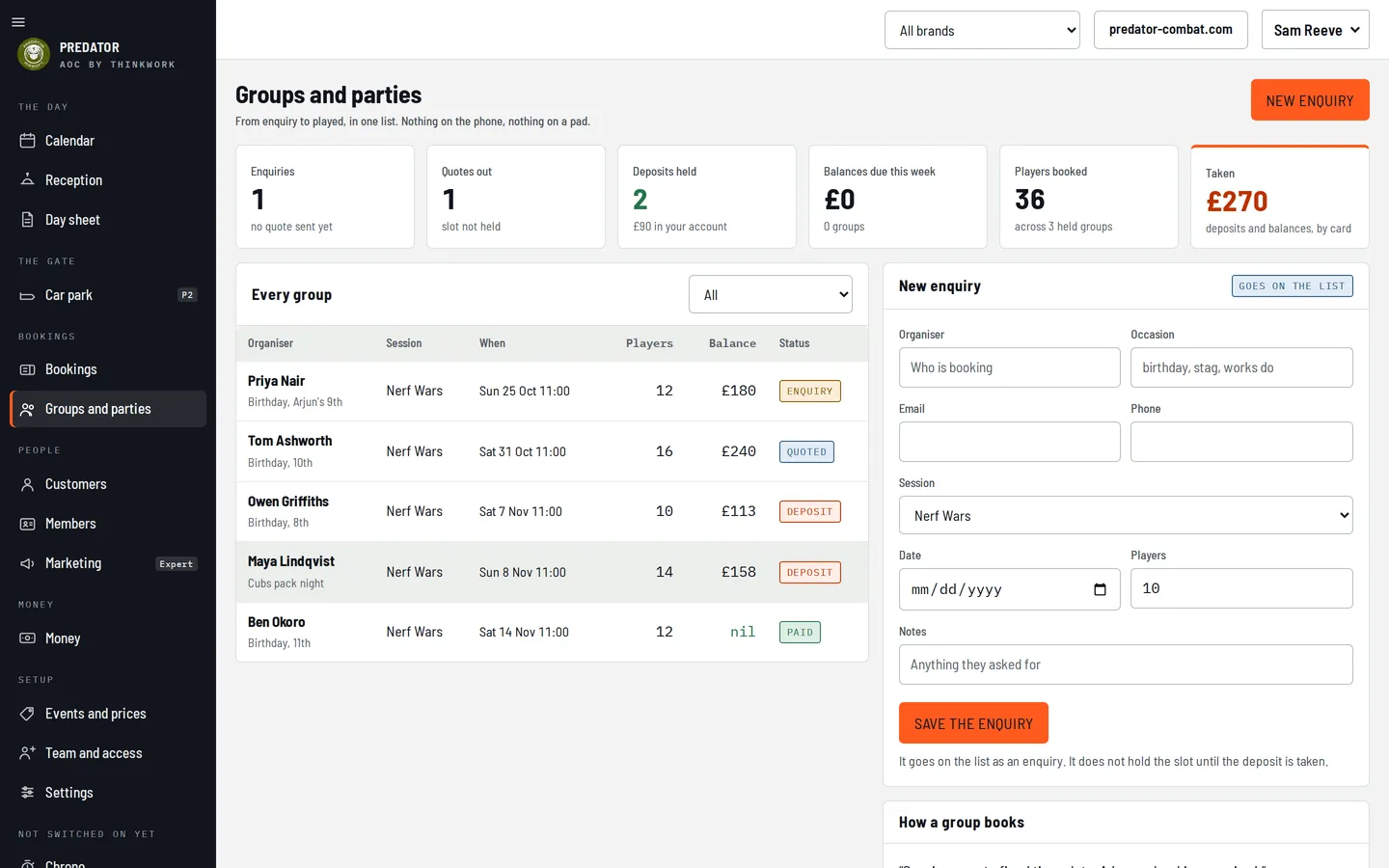
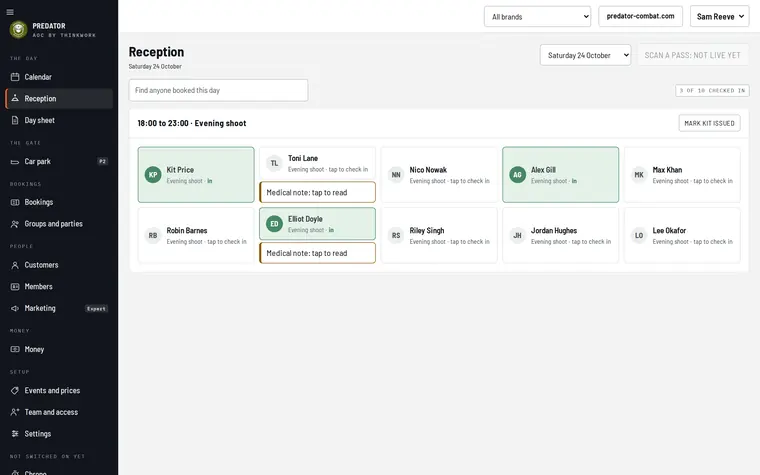
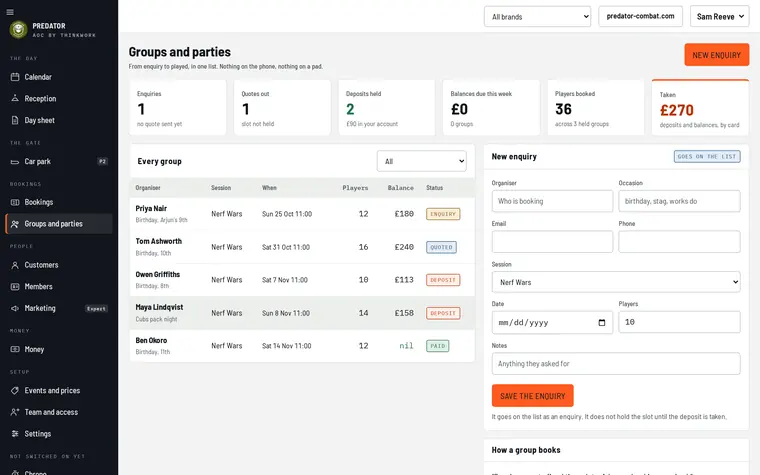
The AOC calendar: October with each running day showing players booked against capacity, and Saturday's sessions, check-ins and disclaimers in the day panel Reception on a game day: each player as a card, checked-in players in green, a medical note flagged, unsigned disclaimers in red Groups and parties: Nerf Wars birthday parties listed with organiser, date, players, balance and stage from enquiry to paid
Real screens, sample bookings
Online bookingReceptionWaiversGroups and partiesMembersMoney
The promise

Everything between a player's phone and your gate, in one console, in your colours.

  • Booking
    A player picks a day, a session and who is coming, signs the disclaimer and pays, on their phone, in under two minutes. No account, no app.
  • Game day
    Reception opens to the day's list. Tap to check in. Red means not signed, a note means read it before they play.
  • Parties
    An enquiry, a quote, a deposit, the balance, played. One list, nothing on the phone, nothing on a pad.
  • Money
    Card money goes to your Stripe account, not ours. What is paid and what is due on the day sits against every booking.
  • Your site
    The booking flow sits on the website you already have, or on one we build. The console carries your name and your colours.
The product, shown

Not described. Shown.

Every screen below is the real console, running on a demonstration site with sample bookings. Nothing is a mock-up.

01 · Calendar

Booked against capacity, every running day.

  • Month and week views built from your running days and your events, with places booked over places available on each one.
  • A day panel for any day: sessions, players booked, checked in, disclaimers outstanding, kit to issue, money taken online.
  • Needs attention names the things to do: a medical note to read, a quote to send, a deposit to chase.
  • Capacity per session and per area, with a one-day override for a big event.
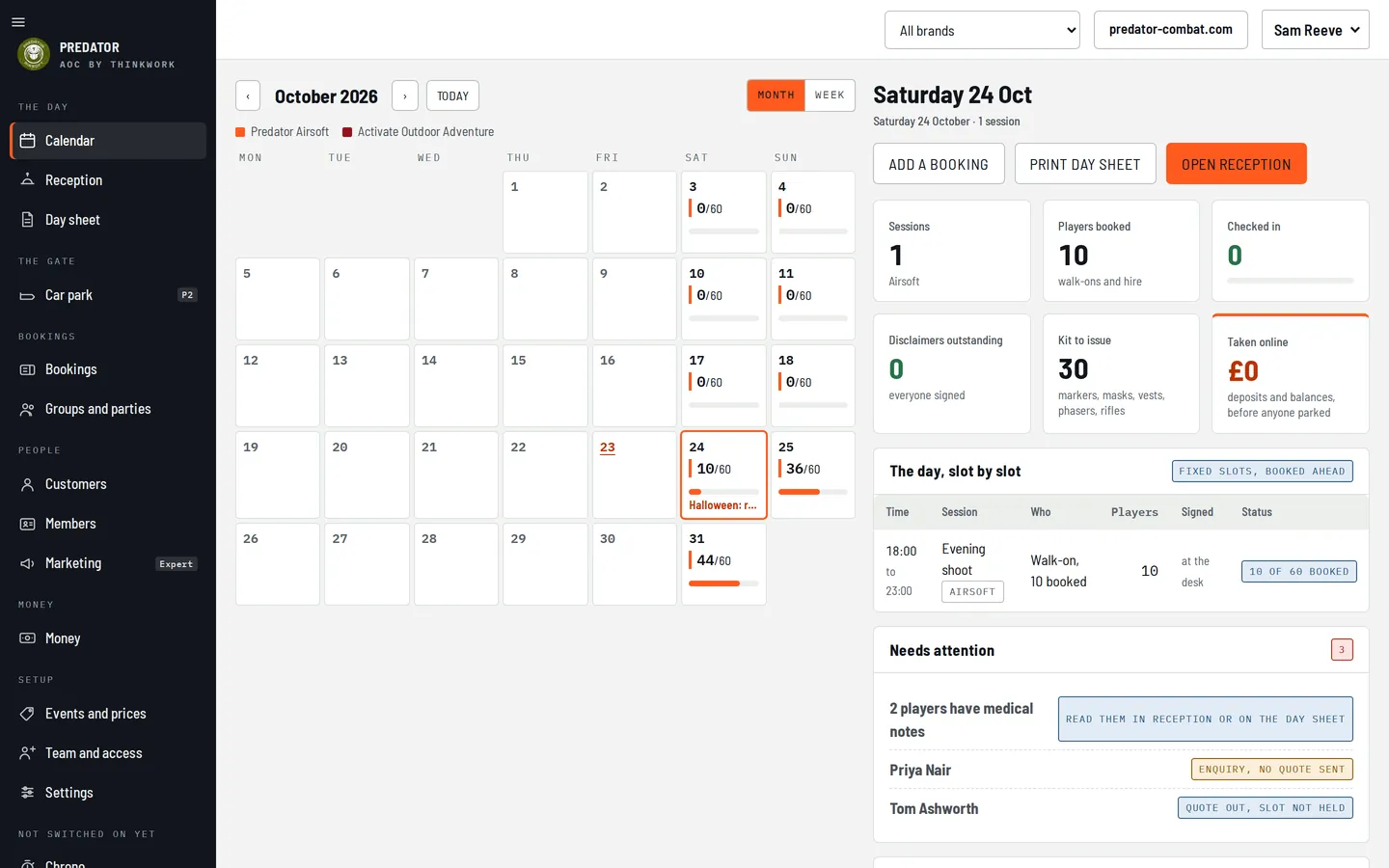
The AOC calendar home: October 2026 in month view with 10 of 60 booked on the 24th, 36 of 60 on the 25th and 44 of 60 on the 31st, and the day panel for Saturday 24 October
Calendar home, desktop
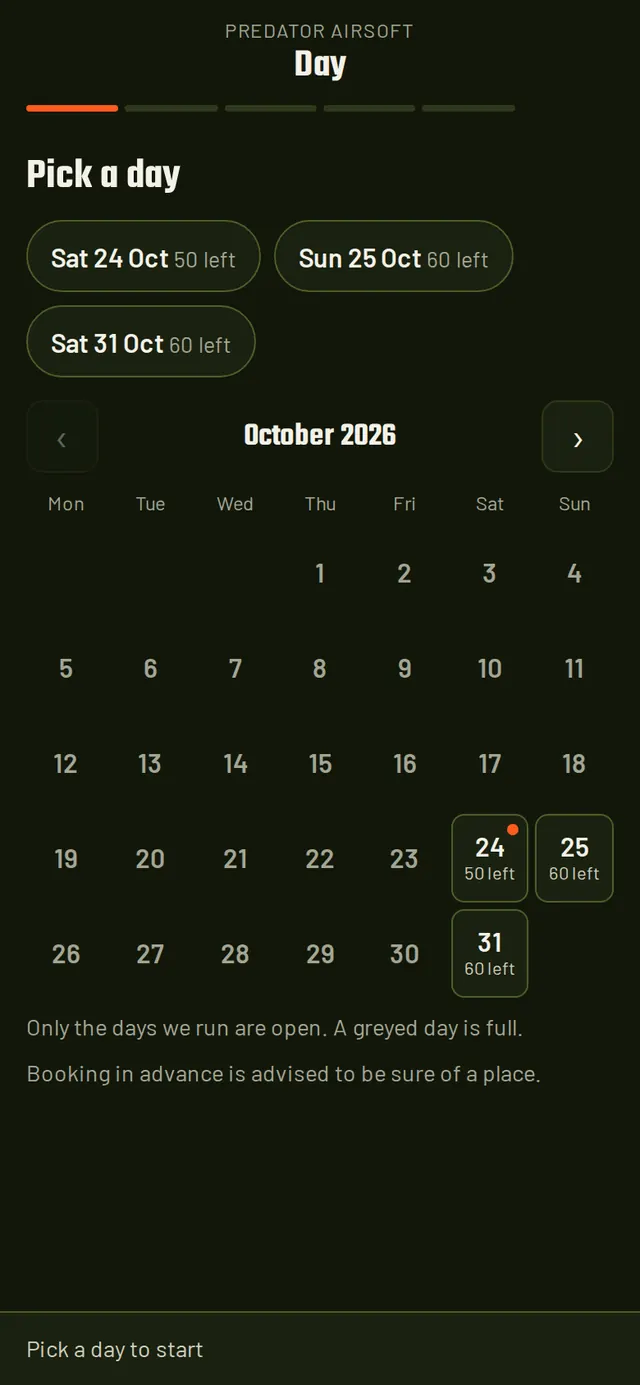
02 · Booking on a phone

Day, session, players, paid.

  • Only the days you run are open, with places left on each. A full day says so and what to do instead.
  • Hire kit per player, or everyone at once. Under-18s sign with a parent or guardian. Players under your minimum age are turned away by the server, not the page.
  • Apple Pay and Google Pay through Stripe, a deposit or the full amount, or pay at the gate on sessions you set that way.
  • The confirmation by email, with a link for mates to sign their own disclaimer before the day.
Step one of the booking flow on a phone: pick a day, with the next three running days as chips and October's calendar showing places left
Pick a day
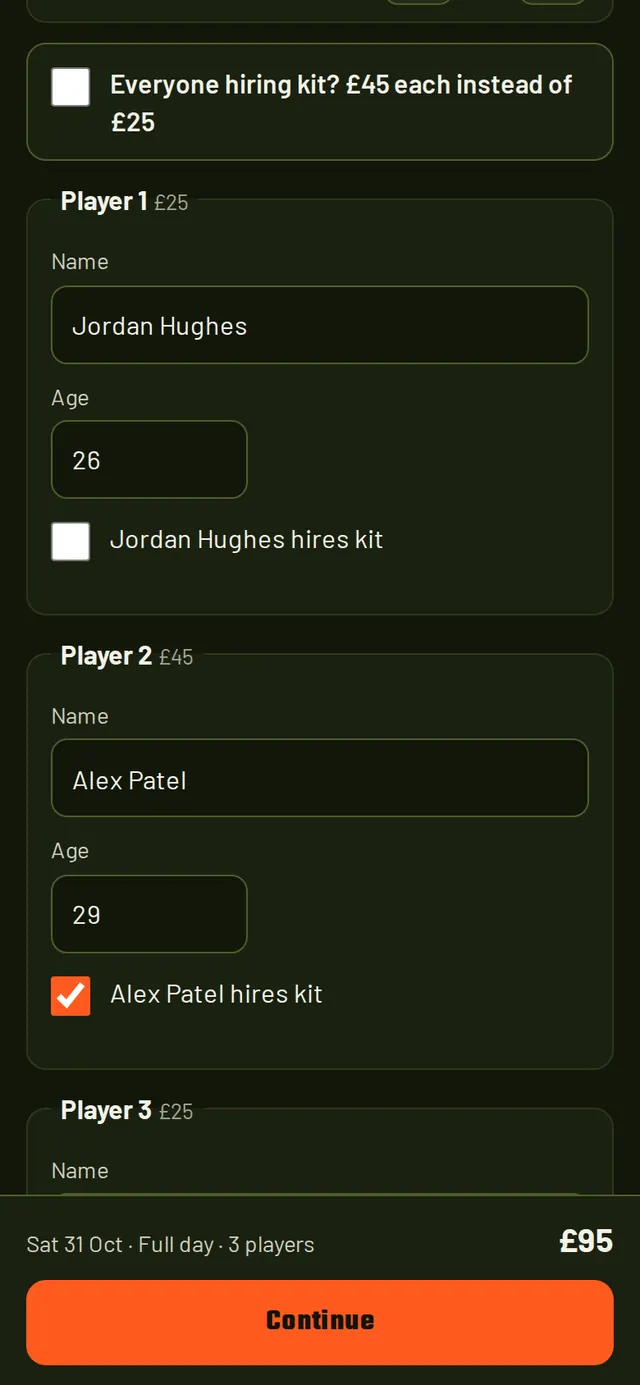
Players step: a stepper for how many, an everyone-hiring switch at £45 instead of £25, and a name, age and hires-kit box per player
Who is coming
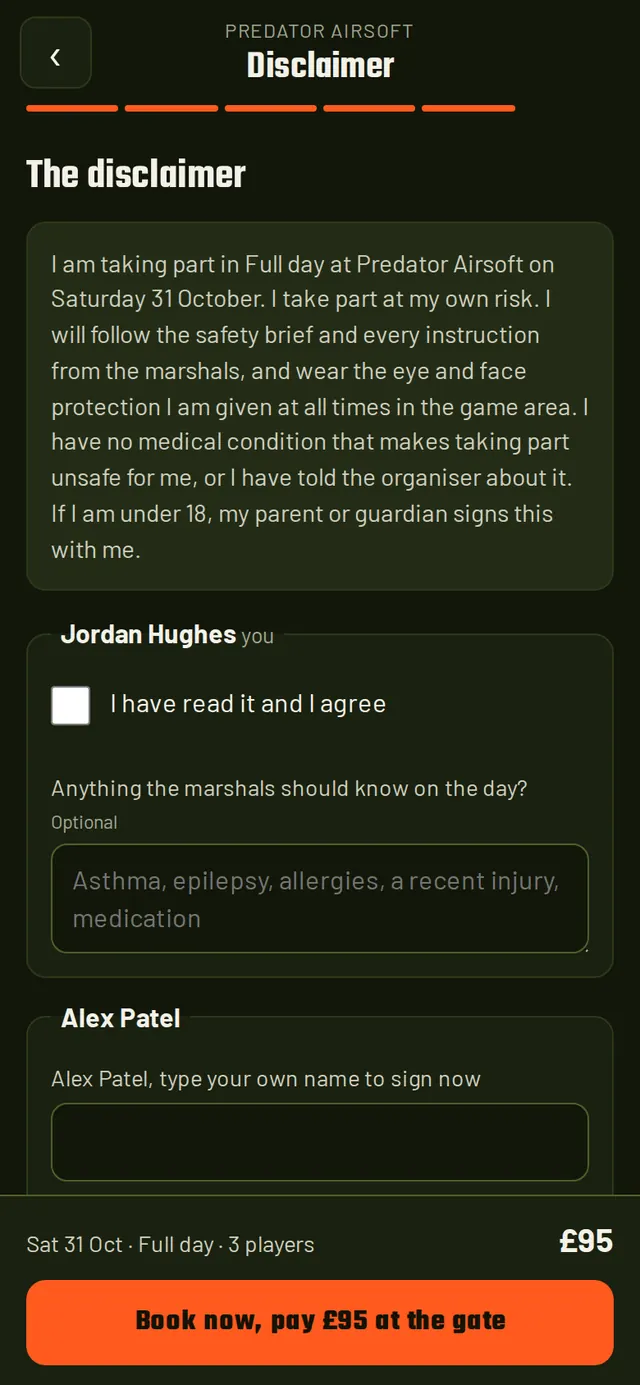
Disclaimer step: the site's disclaimer text, a tick to agree, an optional box for anything the marshals should know, and the Book now button with the price
Sign and pay
03 · Reception

Who is in, who has signed, who to talk to.

  • One card per player for the day. Tap to check in. Green is in. Red has not signed the disclaimer: sign it on the tablet, there and then.
  • Medical notes show on a tap, to the people who should see them, and are deleted after the game day on a timer you set.
  • Kit issued in one press for the session, and a printable day sheet for the marshals.
  • Any day, any brand, searchable by name or reference. Works on a phone at the gate.
Reception for Saturday 24 October's evening shoot: ten player cards, three checked in and shown green, two carrying a medical note to read, four marked disclaimer not signed
Reception, desktop. The same screen runs on a phone.
04 · Groups and parties

Enquiry, quote, deposit, played.

  • Take the enquiry on the screen: organiser, occasion, session, date, how many. It goes on the list; the slot is not held until the deposit is in.
  • Send the quote from the console, with the deposit worked out from your percentage.
  • Deposit and balance by card over the phone, bank transfer or cash, each recorded against the party. Every parent gets a disclaimer link.
  • Check the whole party in one at a time or all at once on the day, then mark it played.
Groups and parties: five Nerf Wars parties with organiser, occasion, date, players, balance and a stage badge reading enquiry, quoted, deposit or paid, and the new enquiry form
Groups and parties, desktop
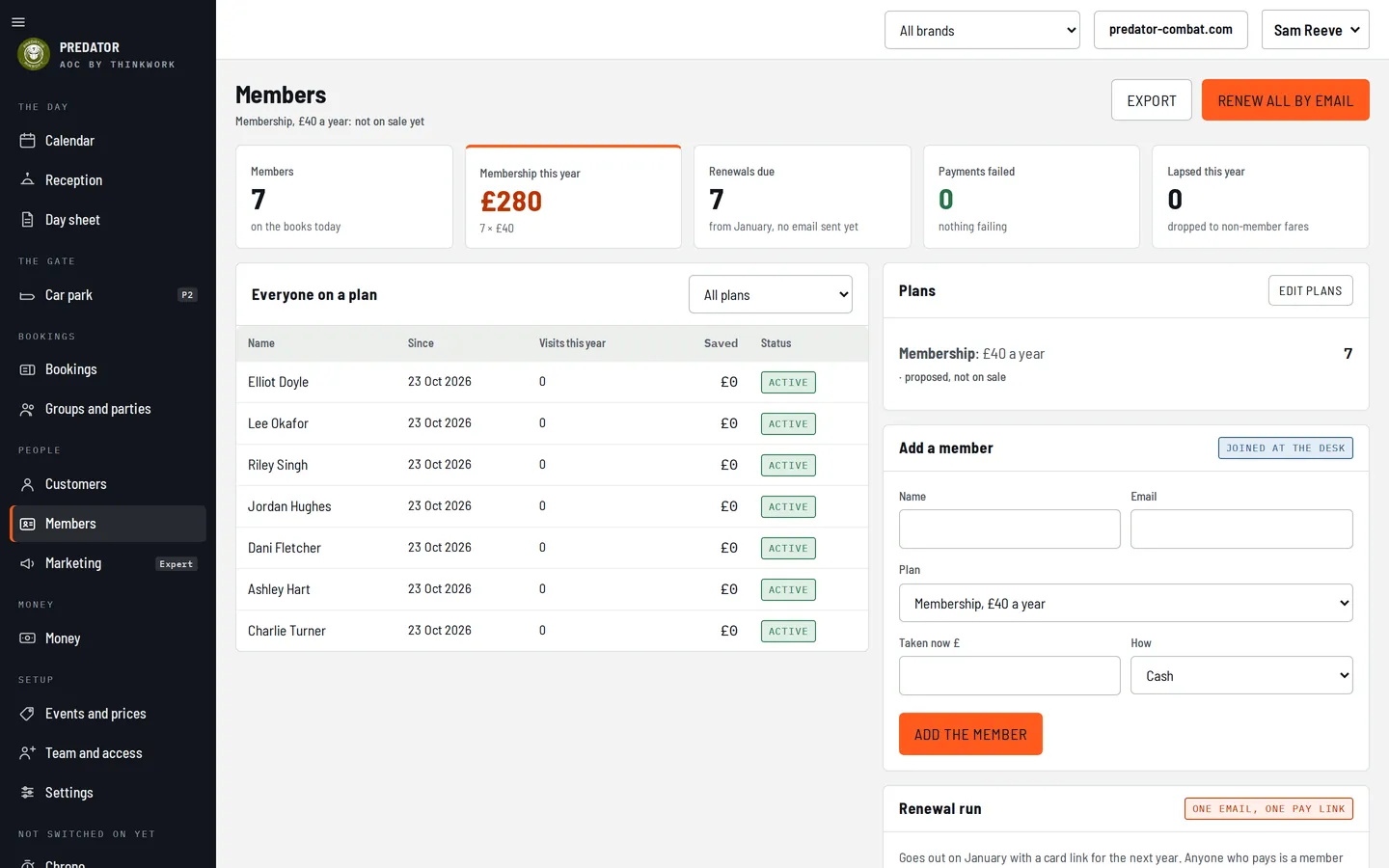
05 · Members

Plans, renewals, the lapsed.

  • Your plans, a year or a month, with what each one saves a member at the checkout.
  • Everyone on a plan with visits this year, saved so far and status. Add a member at the desk in four fields.
  • Renew all by email in one run when the season turns. Who has paid, who has not, who has lapsed.
Members: seven members on the books, £280 of membership this year, the list of everyone on a plan, the plan editor and the add-a-member form
Members, desktop
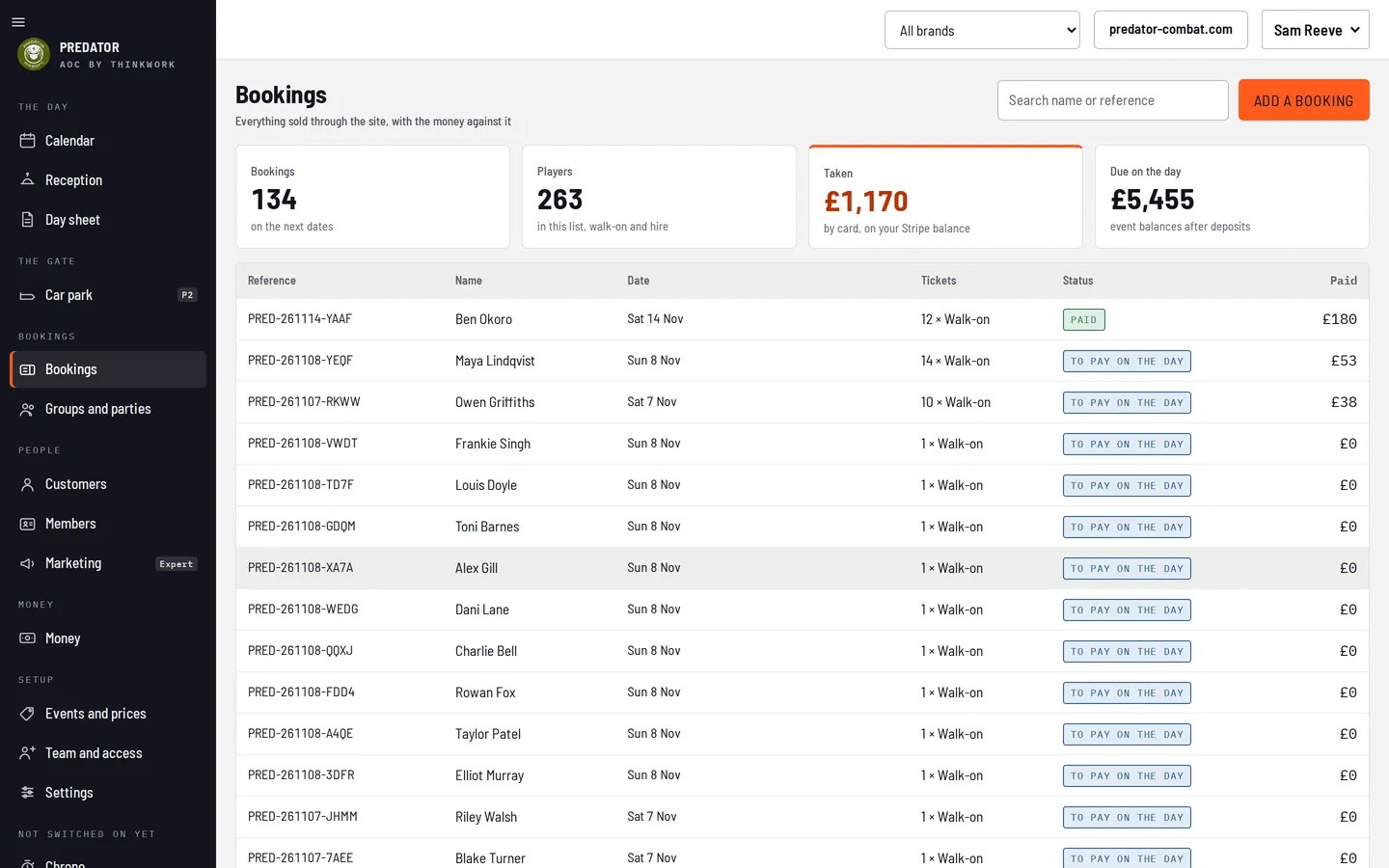
06 · Money

Paid, due on the day, in your Stripe account.

  • Every booking with its tickets, what was paid and what is due at the gate, searchable by name or reference.
  • Card money is yours: it is paid to your own Stripe account and paid out on Stripe's schedule. AOC keeps 2% of each online booking and nothing else.
  • Refunds from the booking, with the amount and the method shown before you confirm, back the way it came.
  • Add a booking by hand for the phone call and the walk-up, with the same rules as the site.
Bookings: 134 bookings and 263 players on the next dates, £1,170 taken by card on your Stripe balance, £5,455 due on the day, and the list of bookings with reference, name, date, tickets, status and paid
Bookings, with the money against each one
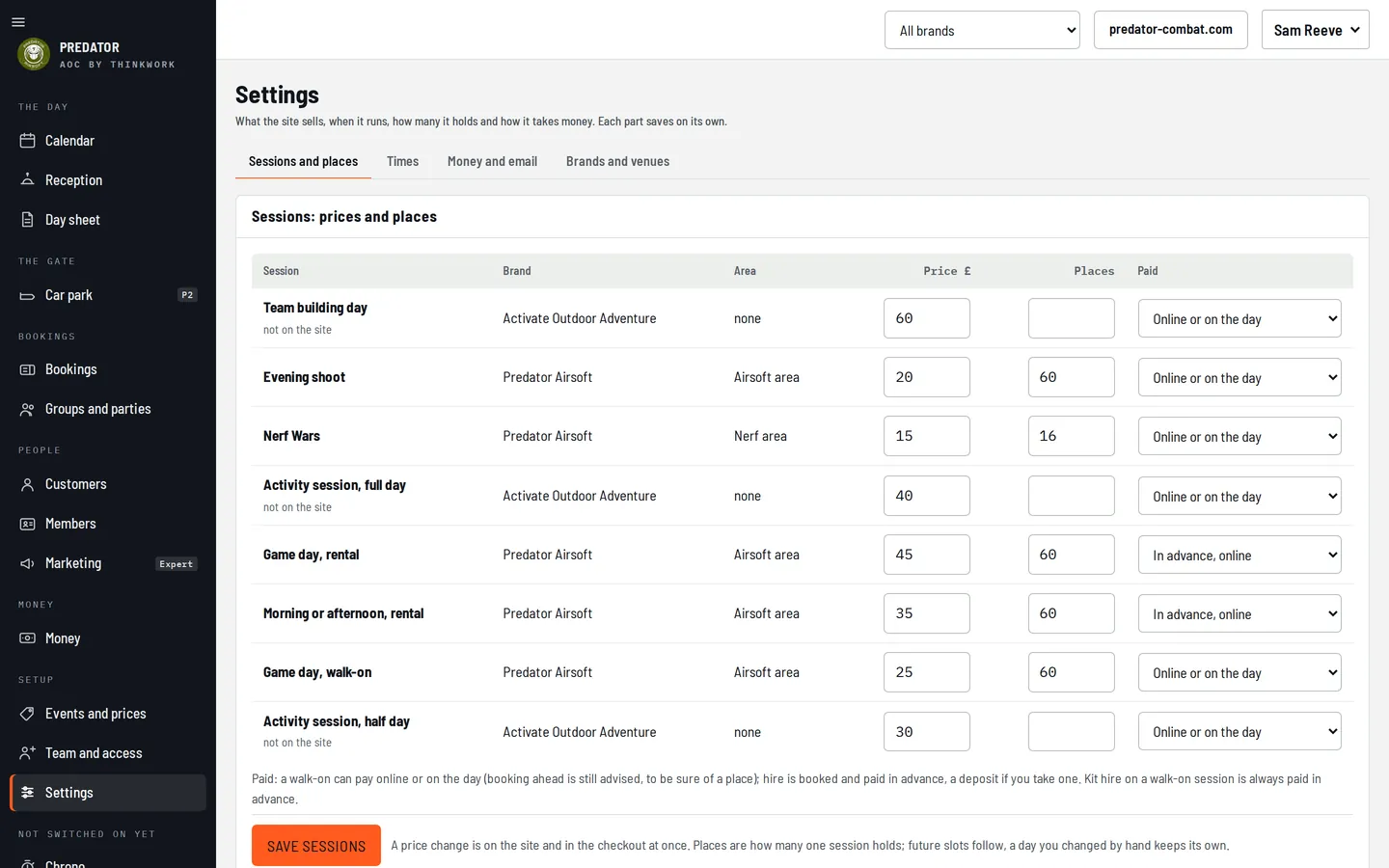
07 · Settings

Your sessions, your prices, your colours.

  • Sessions, prices and places on one screen. A price change is on the site and in the checkout at once.
  • How each session is paid: online or on the day for walk-ons, in advance for hire, your call per session.
  • Brands and venues: more than one brand on one account, each with its own name, colours and booking page.
  • Email and texts from your name, and on Expert from your own domain.
Settings: sessions, prices and places for two brands on one account, with a price, a capacity and a paid-online-or-on-the-day choice per session
Settings, desktop
How it works

Set up in an afternoon.

01 · Your site or ours

The booking flow goes on any website.

One line of script on the page you already have, in the brand's colours. No website yet, or one that needs replacing? ThinkWork builds airsoft sites too, with the flow built in.

02 · The console in your colours

Open it on a laptop, a tablet or a phone.

Owner, manager, marshal and gate each see what their job needs. A first-sign-in tour shows each of them round. Invite the team by email.

03 · Go live

Business, venue, sessions, prices, places, kit, email.

The set-up wizard walks through them in order and generates your calendar from your running pattern. Connect Stripe and cards switch on. Nothing to install, nothing to host.

<script src="https://aoc.peerlab.ai/embed.js" data-brand="your-site"></script>
No app for playersNo account to makeDeep links to a day or a sessionWorks inside your page on a phone
Prices

Three plans. One number that never changes.

Monthly plan prices are on request: ask and we quote you before you commit to anything. What is fixed: 2% of each online booking, and nothing to install.

PlanWhat it carriesMonthly
LiteOne brand, one venue
  • Online booking and card payment
  • Reception, check-in and the day sheet
  • Waivers with medical notes and an emergency contact
  • Calendar with capacity
MonthlyAskOn request
ProThe whole game dayMost sites
  • Everything in Lite
  • Groups and parties, enquiry to played
  • Members and renewals
  • The booking widget on your own site
  • More than one brand on one account
  • Customers: one record per person across brands
MonthlyAskOn request
ExpertMore than one site
  • Everything in Pro
  • More than one venue
  • Marketing: segments, campaigns, reminders by text
  • Dashboards
  • Email sent from your own domain
MonthlyAskOn request

Per online booking

Two per cent of each booking paid through the flow, taken at the time, plus Stripe's own card fee. No set-up fee. Nothing to install. Bookings you take by hand at the desk cost nothing.

2%and that is all
Your Stripe accountCard money is paid to your Stripe account, not through ours.
Your dataBookings, customers and waivers are yours. Export them any time.
Invite only, for nowRequest access and we reply with a quote and a sign-in.
Built with real sites

Made with two sites, not for a brochure.

Predator Combat

Two brands, one account

Predator Airsoft and Activate Outdoor Adventure run on one AOC account: walk-on game days, rental packages, evening shoots, Nerf Wars parties, team-building days. The console and the booking flow on this page are theirs, with sample bookings.

1066 Airsoft

A ThinkWork website client

1066 Airsoft's site is a ThinkWork build. AOC is provisioned for it from the same configuration as the website, so the booking flow and the site agree on sessions, prices and dates.

Questions

The ones every site asks.

Do players pay a deposit or the whole thing?

Your choice, per brand and per session. Walk-on sessions can be paid online or at the gate. Hire kit is paid in advance, so a hired rifle is never booked by someone who does not turn up. Parties pay a deposit to hold the date, at the percentage you set, and the balance before the day.

How do waivers work?

The person booking signs the site's disclaimer in the flow. Everyone else on the booking signs their own, by the link in the confirmation email or on the tablet at reception. Reception shows who has not signed in red, and nobody is checked in until they have. Each player is asked whether there is anything the marshals should know; the answer and an emergency contact are stored apart from the booking, shown to the people who need them, and deleted after the game day on the timer you set.

What about under-18s?

You set the minimum age. Below it, the booking is refused by the server, whatever the page says. Between the minimum and 18, a parent or guardian signs with the player, in the flow or at the desk. The emergency contact is required for them.

Can I refund a booking?

From the booking, in the console. The amount and the method are shown before you confirm, and the money goes back the way it came. Card refunds go through Stripe; a cash or bank-transfer payment is recorded as refunded. Your refund window, in days before the game day, is a brand setting.

I run more than one brand, or more than one site.

More than one brand on one account is in Pro: each brand has its own name, colours, booking page and email voice, and reception can show one brand or all of them. More than one venue, each with its own sessions and capacity, is in Expert.

Can emails come from our own domain?

On Expert, yes. Name the domain in Settings, add the records we show you, press check, and every booking email and campaign is sent from your address. On Lite and Pro, emails are sent from AOC in your name, with replies going to you.

Do we need a new website?

No. The booking flow is one script tag on the site you have, and it opens as a full-screen sheet on a phone inside your page. If you want a new site, ThinkWork builds airsoft and adventure sites with the flow built in.

What does it cost to take money?

Two per cent of each online booking, and Stripe's card fee. Bookings taken by hand at the desk cost nothing. Monthly plan prices are on request.

Request access

Run your next game day on AOC.

AOC is invite-only for now. Ask for access, or for a demo first: tell us about your site and we reply with a quote, a sign-in or a time to talk.

What happens nextYou fill in the site's name and yours, and say whether you want a demo first. We set the account up, send the sign-in, and walk you through the wizard if you want company. Most sites are live the same week.